

AI Essentials: How to Use Perplexity to Research Faster and Smarter
If Google gives you ads and clutter, Perplexity gives you clean, sourced answers. It’s the research virtual assistant built for professionals who need fast, trusted, verifiable info.
When you’re over 40, you’ve already spent years learning how to dig through Google results, click 12 tabs, and cross-check sources manually.
But what if you could cut that down to one window and 30 seconds?
Perplexity is the AI-powered research assistant that gives you direct, cited answers from across the internet—without the distractions, fluff, or SEO traps.
If you do any kind of market research, competitor analysis, writing, training, or decision support in your job, this might be one of the most useful tools you’ll ever use. Remember my massive data project I told you about? ChatGPT told me that Perplexity would do a more exhaustive web search than ChatGPT would, then ChatGPT created custom prompts for me to use with Perplexity to get the answers we wanted. It does a much better job finding authoritative, cited sources.
What Is Perplexity?
Perplexity is an AI-powered search engine that blends the clarity of ChatGPT with the sourcing and structure of academic research. You ask a question, and it gives you a direct answer—with links to where it got the information. I used it in conjunction with ChatGPT (not instead of.)
Unlike ChatGPT, it searches the live internet, and unlike Google, it summarizes the results for you with citations, sources, and follow-up options.
It’s clean, accurate (most of the time), and ideal for professionals who want trusted information, fast.
Why It Matters for Mid-Career Professionals
You don’t have time to scan 10 articles and decide what’s real. Perplexity lets you:
Get sourced, relevant answers instantly
Verify facts without jumping through links
Generate short, accurate write-ups
Stay current in your field with live web data
Dig deeper with suggested follow-up questions
Whether you're preparing for a meeting, rewriting content, building presentations, or just brushing up on a topic—this tool saves time, reduces noise, and makes you sharper.
Free vs. Paid: What You Get (and What You Miss)
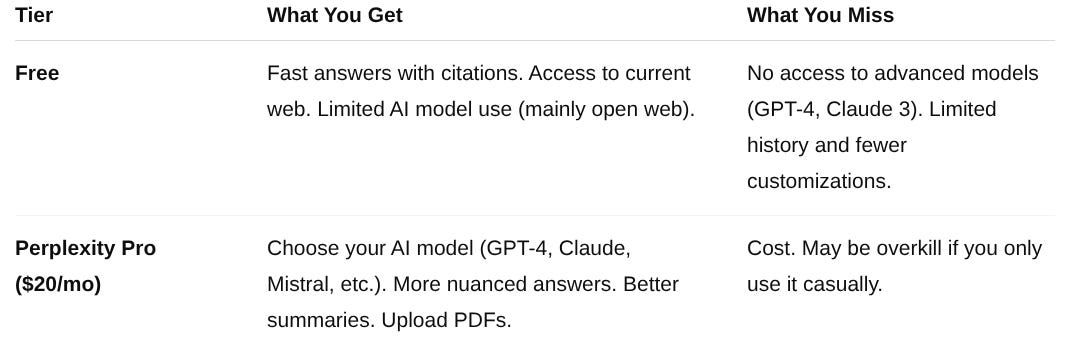
What do I get with the Free (Standard) plan?
Search history access
Unlimited basic searches
3 Pro searches per day (Pro Search leverages advanced AI models like GPT-4.1, Claude 3.5 Sonnet, and Gemini 2.5 Pro to conduct thorough research, analyze information, and synthesize detailed responses. It also shows the step-by-step reasoning behind the answer and links to all sources used.)
3 Deep Research uses per day (This mode is for more specialized and in-depth research. It goes further by referencing multiple clinical studies, checking for conflicts, and detailing interactions, resulting in a more comprehensive and detailed picture.)
We pick the best model to use for your query
Basic file uploads (limited)
3 file attachments per day.
No access to advanced AI models, image generation, or premium support.
5 File uploads per Space.
💡 Should You Upgrade?
Yes—if you’re in a research-heavy or content-heavy role. No—if you’re using it for occasional fact-checking or quick reference. This is not one I will pay for, but I might grab a one month subscription if I was doing a deep dive. Will your company pay for it on a short term basis as a business expense? You might be able to find a promo code for a discount on Perplexity. The three Pro searches and the three Deep Research requests per day are enough for normal use for me.
I am starting to think eventually there will be no free tiers for these platforms.
Strengths
Blazing fast, clean, and easy to use
Provides citations with every answer, which is great for research report writing
Allows follow-up questions to refine results
Searches live web, unlike most AI tools so results are more current than ChatGPT
Great for presentations, writing, and analysis
Great daily advanced use of Pro searches (3x) and Deep Research (3x)
Weaknesses
Less creative than ChatGPT or Claude, much more dry
Not as good for ideation, drafting, or tone/style work
Occasional hallucinations (fact-check when it matters)
Interface is minimal—some may prefer more structure
Think of it like the difference between a human marketing personality (ChatGPT) and a human data analyst personality (Perplexity)
Try This Today: Your 5-Minute Perplexity Challenge
Go to perplexity.ai
Try this prompt:
“What are the most effective strategies for re-engaging lapsed retail customers?”
Then try:
“List 5 sources that support those strategies.”
Watch how it summarizes insights and shows you the original sources with links—ready to read or cite.
Now you’re researching like a pro.
Bottom Line
Perplexity won’t write your resume or organize your schedule—but it will save you hours of digging through junk content online.
If your job involves thinking, preparing, comparing, or communicating information, this is a serious upgrade over Google.
Once you start using it, it’s hard to go back.
You’re Not Too Old. You’re Not Too Late.
In the past, experience was your edge. Now, it’s experience + speed. Tools like Perplexity put deep, accurate knowledge at your fingertips—instantly.
Keep going with the AI Essentials series from ChalkTalk.ai. Next week, we’ll explore Microsoft Copilot—the built-in assistant hiding in your Outlook, Word, and Excel files that can automate, summarize, and accelerate your daily office tasks. Copilot made one of the largest impacts on my massive data project because we just kept going deeper and deeper down data levels with Copilot. It would generate me data, and then suggest the next data set to take the project to the next levels, and then the next. I spent a few hours with Copilot generating data. Remember, the more data you feed the AI, the better outcome. Learn to use Copilot for sure.
See you next Tuesday for our discussion on Microsoft Copilot.